How to
handle when short week meets public holiday
Introduction
Normally,
we define “Long / Short week” by setting 2 duty rules on, say, Saturday to
represent “Long week” and “Short week”. By setting the option “Repeat
per week” = 2 and the “Effective start date” 1 week delay
between the 2 duty rules, the “Long week” and “Short week” will be auto
assigned alternatively until “Effective end date”. See
example below :
|
1 |
2 T |
3 W |
4 T |
5 F |
6 S |
7 S |
8 M |
9 T |
10 W |
11 T |
12 F |
13 S |
14 S |
15 M |
16 T |
17 W |
18 T |
19 F |
20 S |
21 S |
22 M |
23 T |
24 W |
25 T |
26 F |
27 S |
28 S |
29 M |
30 T |
|
|
|
|
|
|
|
|
|
|
|
|
|
|
|
|
|
|
|
|
On Duty |
|
|
|
|
|
|
|
|
|
|
||
|
|
|
|
|
|
|
|
|
|
|
|
|
|
|
|
|
|
|
|
|
|
|
|
|
|
Day Off |
|
|
|
||
|
|
|
|
|
|
On Duty |
|
|
|
|
|
|
Day Off |
|
|
|
|
|
|
On Duty |
|
|
|
|
|
|
Day Off |
|
|
|
Sometimes,
the short week day off fall on public holiday (see example below), some
companies have no special arrangement on it. If this is the case, no any
adjustment you need to do.
|
1 M |
2 T |
3 W |
4 T |
5 F |
6 S |
7 S |
8 M |
9 T |
10 W |
11 T |
12 F |
13 S PH |
14 S |
15 M |
16 T |
17 W |
18 T |
19 F |
20 S |
21 S |
22 M |
23 T |
24 W |
25 T |
26 F |
27 S |
28 S |
29 M |
30 T |
|
|
Long week |
|
|
|
|
|
On Duty |
|
|
|
|
|
|
|
|
|
|
|
|
|
On Duty |
|
|
|
|
|
|
|
|
|
|
|
Short week |
|
|
|
|
|
|
|
|
|
|
|
|
Day Off |
|
|
|
|
|
|
|
|
|
|
|
|
|
Day Off |
|
|
|
|
Result |
|
|
|
|
|
On Duty |
|
|
|
|
|
|
Day Off |
|
|
|
|
|
|
On Duty |
|
|
|
|
|
|
Day Off |
|
|
|
However, if
your company policy require to make adjustment to delay 1 week for both
long/short week, the easiest way is splitting the current rules into 2 parts
and then adjust the “Effective start date” of the second part
to 1 week after public holiday. See diagram below
|
Duty rule |
1 M |
2 T |
3 W |
4 T |
5 F |
6 S |
7 S |
8 M |
9 T |
10 W |
11 T |
12 F |
13 S PH |
14 S |
15 M |
16 T |
17 W |
18 T |
19 F |
20 S |
21 S |
22 M |
23 T |
24 W |
25 T |
26 F |
27 S |
28 S |
29 M |
30 T |
|
|
|
|
|
|
On Duty |
|
|
|
|
|
|
|
||||||||||||||||||
|
Long
week-2 |
|
|
|
|
|
|
|
On Duty |
|
|
|
|||||||||||||||||||
|
Short
week |
|
|
|
|
|
|
|
|
|
|
|
|
Day Off |
Effective ended |
||||||||||||||||
|
Not yet effective |
Day Off |
|
|
|
|
|
|
|
|
|
|
|||||||||||||||||||
|
Result |
|
|
|
|
|
On Duty |
|
|
|
|
|
|
Day Off |
|
|
|
|
|
|
Day Off |
|
|
|
|
|
|
On Duty |
|
|
|
For details
please follow below steps:
Steps
1.
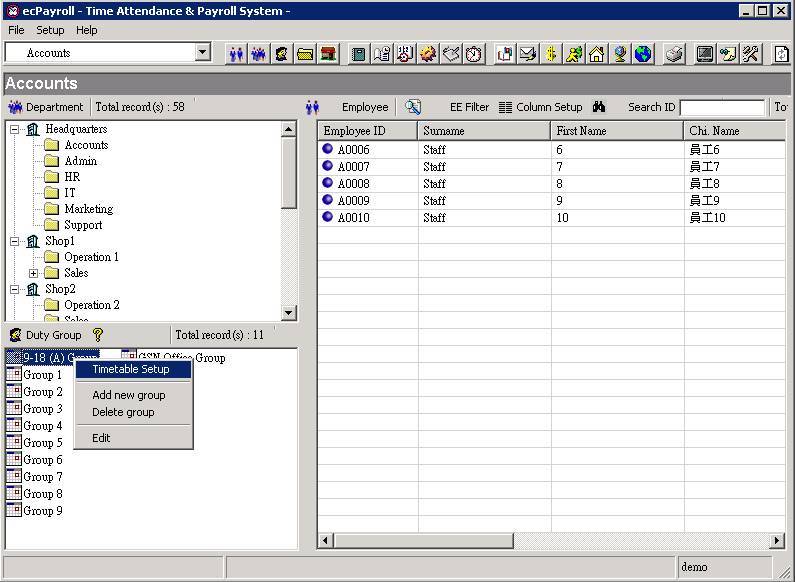
Select and right click the duty group to be edit from
the main screen, then select “ Timetable Setup ”from the menu

2.
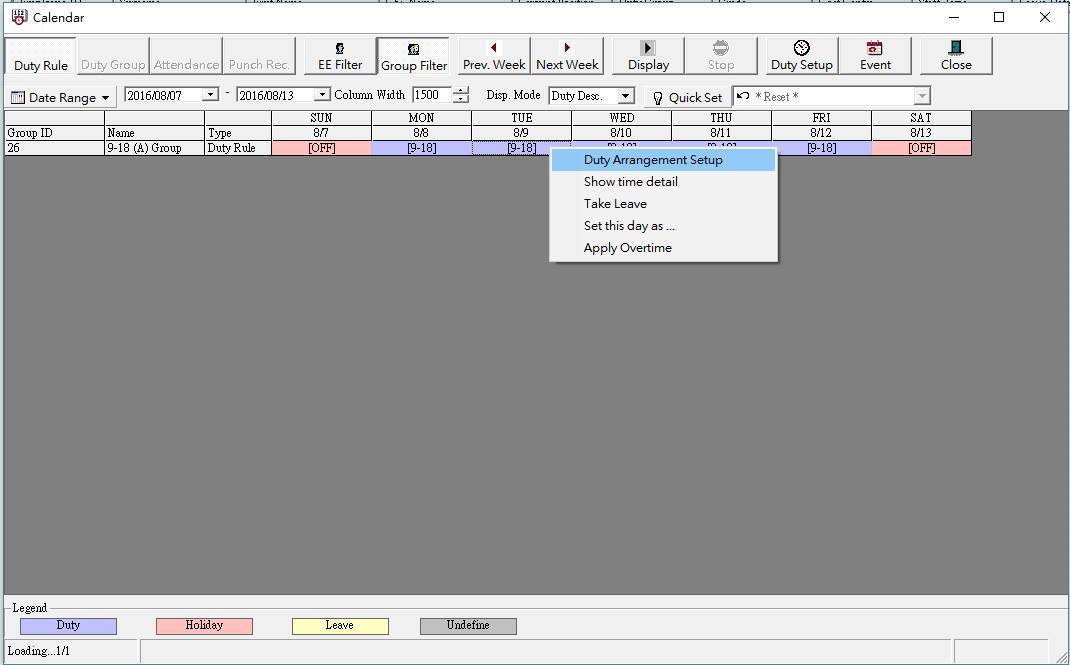
Right
click on the duty rule from the calendar, then select “ Duty Arrangement Setup“ from the menu

3.
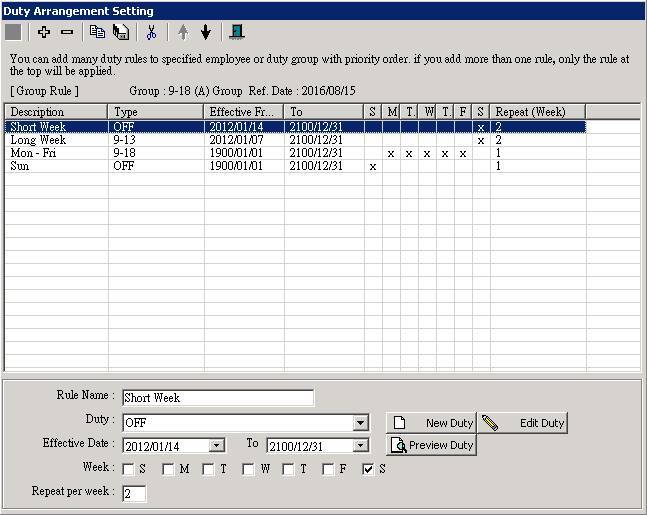
You may find two Saturday duty rules on the list (i.e.
“Short Week” and “Long
week” here). Select any one of the Saturday duty rule, say
“Short Week” first, then click
the [ Split into two ] button.


4.
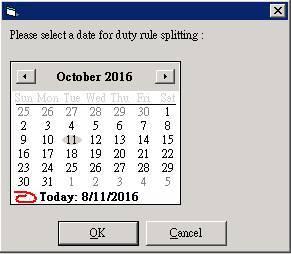
Split the duty rule by select next Saturday after the
Public Holiday. (e.g. The original roster of 2016/10/01 is short week, but
Public Holiday fall on the same day. The next short
week after the Public Holiday will be 2016/10/08, so select 2016/10/08 as the
new effective date of the new short week duty rule after splitting). Click the
[ OK ] button to confirm.
5.
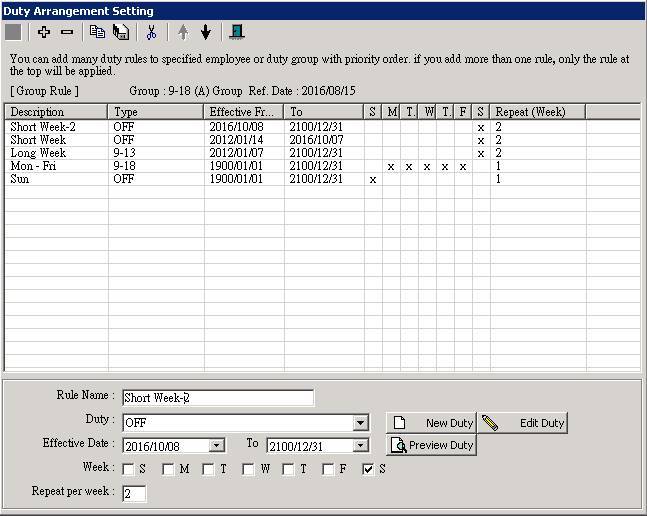
The system will then create a new duty rule with
effective from the date you selected in last step. At the same time, the system
ends the current rule on the day before the split date automatically. Repeat
steps 3 - 4 to split another Saturday duty rule (i.e. “Long
Week”here).

6.
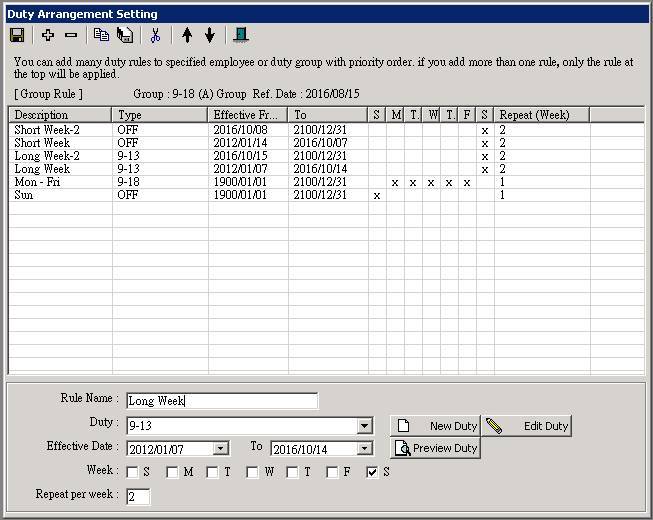
Now, you should find 2 “Short week”rules and 2 “Long week”rules after splitting. Click the [ Update ] button to save the changes

7.
Click the [ Close
] button to return to the “ Calendar ” page
8.
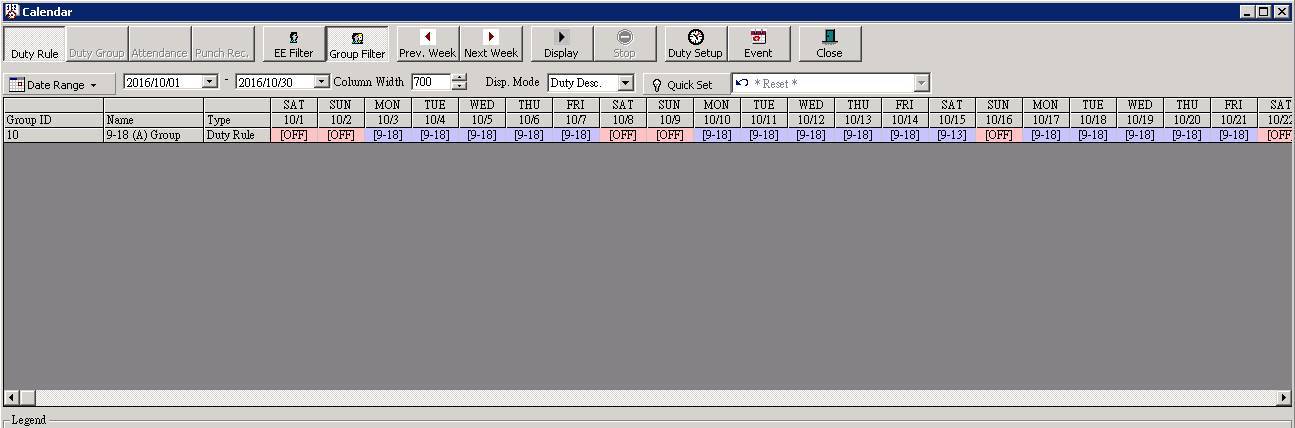
The setting is done, you may check the result at the “ Calendar ” page
Before splitting the rule, 10/08 is long week 10/15 is short week ….
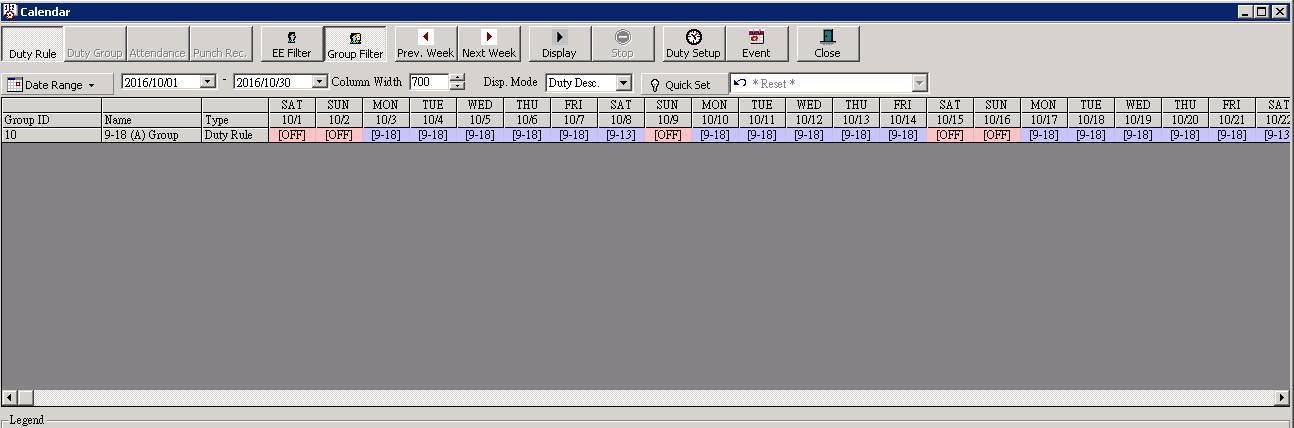
After splitting the rule, 10/08 becomes short week 10/15 becomes long week ….